Automated VCF 9 Offline Depot
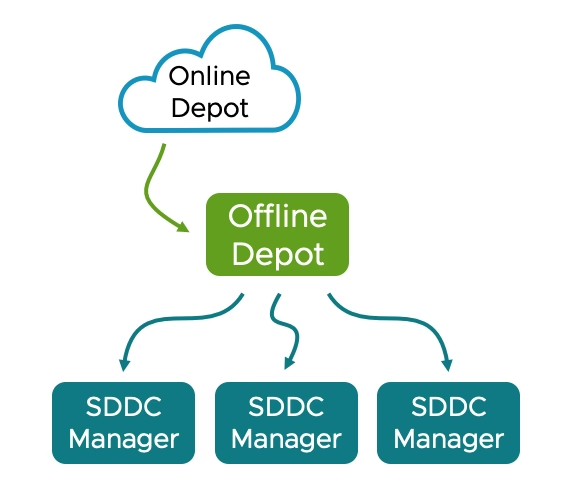
This Automated VCF 9 Offline Depot was built to solve a simple problem: VCF 9 changed its deployment model, and I needed a repeatable, hands-off way to spin one up in my lab. The script and Ansible playbook take a fresh Ubuntu VM and turn it into a fully working depot with publicly-trusted SSL certificates from Let’s Encrypt.
The deployment means no manual Docker installs, no messing with certificates, no clicking through dashboards. Just SSH in, run one command, and have a fully working HTTPS file server with automatic Let’s Encrypt certificates via Cloudflare DNS. It basically simplifies and automates the official process documented here. Thanks to Gareth for pushing me to finish this and helping with testing.
If you want to jump in and deploy right away, you can execute the below or go and look at the GitHub repo here
curl -sSL https://raw.githubusercontent.com/jameskilbynet/iac/main/docker/vcf9-offline-depot/deploy.sh -o /tmp/deploy.sh
sudo bash /tmp/deploy.shTable of Contents
Prerequisites
- A Cloudflare-managed domain + API key with DNS
Zone:DNS:EditandZone:Zone:Readpermissions - Ubuntu 22.04+ with at least 100GB of free disk space. I would recommend 200GB+
- Internet access from the Ubuntu VM
- DNS records to be used for the web server and the Traefik dashboard. For this I am using
vcf.jameskilby.cloudandtraefik.jameskilby.cloud
What it does
- A single bash script takes a vanilla Ubuntu server and builds the entire stack:
- Installs Git, Ansible, Docker Engine and Docker Compose
- Deploys Traefik as a reverse proxy with automatic wildcard SSL via Cloudflare DNS challenge
- Deploys Nginx as a file server with directory browsing enabled
- Creates a
/vcfdirectory on the host, owned by the deploying user, mounted into the container - Protects the web server with HTTP basic authentication
- Forces all HTTP traffic to HTTPS
- Exposes the Traefik dashboard on its own subdomain

The script pulls and executes the below files.
docker/traefik-nginx/
├── deploy.sh              # Bootstrap script — run this
├── playbook.yml           # Ansible playbook — does the work
├── docker-compose.yml     # Root compose file
├── .env.example           # Example environment variables
└── compose/
    ├── traefik.yml        # Traefik reverse proxy
└── nginx.yml # Nginx file serverWhen it’s deployed you can drop the VCF installer files into the /vcf directory and they are passed through to the web server for use in VCF deployments. I do this using FileZilla but any method will work.
What the script does under the hood is
1. Docker Installation — Adds Docker’s official GPG key and APT repository, installs Docker Engine, CLI, containerd, Buildx and the Compose plugin. It detects the system architecture automatically so it works on both amd64 and arm64.
2. Directory Structure — Creates the stack directory at /opt/traefik-nginx with subdirectories for compose files, Traefik config, and Nginx config. Creates /vcf owned by the user who ran sudo so you can write files there without root.
3. Nginx Config — Writes a custom default.conf that enables autoindex for directory browsing with human-readable file sizes and local timestamps.
4. Traefik Static Config — Generates traefik.yml with:
- HTTP and HTTPS entrypoints
- Cloudflare DNS challenge for Let’s Encrypt certificates
- Docker provider for automatic service discovery
- Dashboard enabled via its own subdomain
5. Environment File — Writes .env (mode 0600) containing the domain, subdomain, Cloudflare token, basic auth hash, and install directory. Docker Compose interpolates these into container labels at runtime.
6. Network & Stack — Creates the traefik Docker network (idempotent), then runs docker compose up -d.
The stack is split across two compose files included from a root docker-compose.yml:
Traefik (compose/traefik.yml):
- Binds ports 80 and 443
- Mounts the Docker socket (read-only) for container discovery
- Global HTTP-to-HTTPS redirect via a catchall router
- Dashboard exposed at
traefik.yourdomain.com
Nginx (compose/nginx.yml):
- Mounts
/vcffrom the host as the web root (read-only) - Custom nginx config for directory browsing
- Basic auth middleware via Traefik labels, reading credentials from
${BASICAUTH_USERS}in.env - Serves on
${SUBDOMAIN}.${DOMAIN}
Both containers run with no-new-privileges security option and JSON file logging with rotation.
Security
Whenever you’re adding passwords or tokens into a system, care needs to be taken. The script will handle the Cloudflare API Token and password in a secure manner. When the secure variables are entered they are handled with read -rsp this means that they don’t echo to the terminal as they are entered. These secrets are stored temporarily in a file with root only readable permissions. This has an automatic cleanup so that if the script completes successfully or if it crashes or is stopped manually this file is removed using trap 'rm -f "$VARS_FILE"' EXIT INT TERM
How to use
SSH into your VM and run
curl -sSL https://raw.githubusercontent.com/jameskilbynet/iac/main/docker/vcf9-offline-depot/deploy.sh -o /tmp/deploy.sh
sudo bash /tmp/deploy.shThe script will prompt for your domain, subdomain, web-server username and password, and Cloudflare API token. It confirms your input, then handles everything else.

A few minutes later you’ll see:
═══════════════════════════════════════════
  Deployment Complete
═══════════════════════════════════════════

  Nginx:     https://vcf.jameskilby.cloud
  Traefik:   https://traefik.jameskilby.cloud
  Web root:  /vcf
  Stack dir: /opt/vcf9-offline-depot

  DNS: Point *.jameskilby.cloud to this server's IP.
Certs will be issued automatically via Cloudflare DNS.Your Automated VCF 9 Offline Depot is now running and accessible over HTTPS.
If you then access the nginx web server at your defined address i.e. https://vcf.jameskilby.cloud
It should prompt you to log in using the credentials you defined at runtime. If it’s all working you should be presented with the following webpage and it should be on a fully trusted SSL certificate.

Related reading
If you like the Traefik + Cloudflare DNS pattern used here, the same stack powers my homelab AI infrastructure. These posts cover how it all fits together:
- Automating the deployment of my Homelab AI Infrastructure
- My Self-Hosted AI Stack: Architecture Overview (Part 1)
- My Self-Hosted AI Stack: Infrastructure Deep Dive (Part 2)
Troubleshooting
Most problems fall into one of a handful of categories. Here are the checks I run first when something doesn’t come up clean.
Certificates aren’t being issued
The first thing to do is wait. It can take a minute or more for the process of issuing the certificate to complete. Don’t start troubleshooting immediately.
If, after a minute, Traefik is still serving the default self-signed certificate instead of a Let’s Encrypt one, it’s almost always the Cloudflare API token. Verify the token is valid and scoped correctly:
curl -s "https://api.cloudflare.com/client/v4/user/tokens/verify" \
-H "Authorization: Bearer <token>"The token needs Zone:DNS:Edit and Zone:Zone:Read permissions on the zone you’re issuing certificates for. Then check the Traefik logs for ACME errors:
docker logs traefik 2>&1 | grep -i acmeOne issue you might hit (which I ran into while documenting things) was hitting Let’s Encrypt’s rate limits. You will see something like this in the Traefik logs if you do
sudo docker logs traefik 2>&1 | grep -i "docker" | tail -10

ERR Unable to obtain ACME certificate for domains error="unable to generate a certificate for the domains [jameskilby.cloud *.jameskilby.cloud]: acme: error: 429 :: POST :: https://acme-v02.api.letsencrypt.org/acme/new-order :: urn:ietf:params:acme:error:rateLimited :: too many certificates (5) already issued for this exact set of identifiers in the last 168h0m0s, retry after 2026-04-11 03:06:50 UTC: see https://letsencrypt.org/docs/rate-limits/#new-certificates-per-exact-set-of-identifiers" ACME CA=https://acme-v02.api.letsencrypt.org/directory acmeCA=https://acme-v02.api.letsencrypt.org/directory domains=["jameskilby.cloud","*.jameskilby.cloud"] providerName=cloudflare.acme routerName=nginx@docker rule=Host(`vcf.jameskilby.cloud`)If you’re stuck on a staging certificate after fixing the token, truncate acme.json and restart Traefik so it requests a fresh one:
truncate -s 0 /opt/traefik-nginx/traefik/acme.json
docker restart traefikDocker fails to install
If the playbook fails installing Docker, the VM usually has pending kernel updates waiting for a reboot. Either reboot manually and re-run, or allow the playbook to reboot for you by re-running with -e allow_reboot=true.
Increase Disk Size
The script will fail if you don’t have 100GB of available storage. You will need at least this for the VCF install binaries. If you have presented a single large disk to the VM and used Ubuntu’s auto partitioning it won’t utilise all of the drive. See my blog here on how to expand the disk to its full size
Review the Traefik Dashboard
If you’re still having issues review the Traefik Dashboard https://traefik.domain.com
You should see four routers and six services like the attached screenshots


Basic auth prompt loops
If the depot keeps prompting for credentials even with the right ones, it’s almost always $ escaping. Docker Compose treats $ as variable interpolation, so every $ in the apr1 hash must be doubled to $$. The deploy script handles this automatically, but if you’re editing .env by hand, double-check the escaping.