Unleashing the UDM Beast
Updated to 2.3Gbps:
I have now upgraded my Zen connection to 2.3Gbps and the Beast handles this with ease. This is always useful to know as with a PPPoE connection the overhead and processing can be a limiting factor.

Intro
I thought it was time to update my firewall as the one I have been using for at least 7 years has been showing its age to say the least. Therefore I have decided to retire my WatchGuard M200 and replace it with a Ubiquiti Dream Machine Beast (UDM Beast) The WatchGuard I was using has served me very well but the fans were a bit noisy and it was well past its shelf life. The M200 was originally launched way back in 2015 and officially hit end of life in 2023.

Table of Contents
UDM Beast Specifications
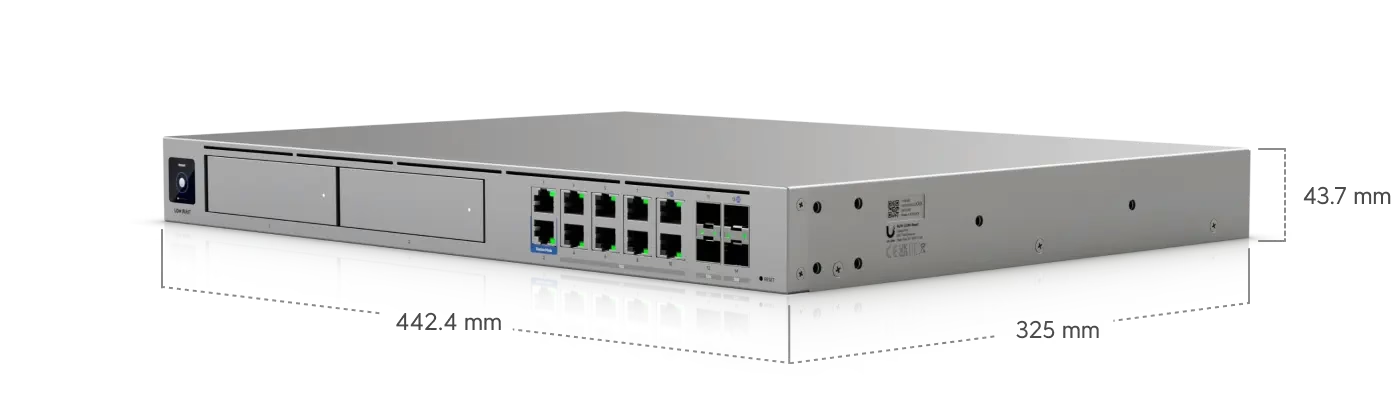
The Beast packs an impressive specification with a variety of ports (14 of both copper and fibre)
- 2× 1GbE RJ45
- 8× 10GbE RJ45
- 2× 10G SFP+
- 2× 25G SFP28
It’s based on an octa-core ARMv9 at 2.1 GHz with 16GB of RAM.
It also has an internal integrated 128GB SSD plus 2x 3.5-inch drive bays.
Performance
The main reason for the upgrade for me was that I needed better inter-VLAN performance. I could have chosen to do this on my switch but I much prefer doing all of my security in one place. Therefore forcing the traffic to the firewall worked for me. According to the spec sheet the Beast can not only route at 25Gb/s but it has a promised 25Gb/s IDS/IPS throughput — something that is unheard of at this price point. I will test this in the future. For now I have just done some basic testing.
For now I need to physically relocate the Beast to get the 25Gb connections to work. Doing this will also allow me to remove a switch, reducing configuration changes, plus a small power and cooling improvement. The below testing is done just with 10Gb uplinks as can be seen by the topology below

iperf
iperf testing from a VMware VM to my bare-metal TrueNAS Scale instance.
 iperf3 -c 192.168.60.1 -P 4 -t 30

[ ID] Interval           Transfer     Bitrate         Retr
[  5]   0.00-30.00  sec  8.39 GBytes  2.40 Gbits/sec  1397            sender
[  5]   0.00-30.00  sec  8.38 GBytes  2.40 Gbits/sec                  receiver
[  7]   0.00-30.00  sec  8.63 GBytes  2.47 Gbits/sec  1164            sender
[  7]   0.00-30.00  sec  8.63 GBytes  2.47 Gbits/sec                  receiver
[  9]   0.00-30.00  sec  8.44 GBytes  2.42 Gbits/sec  1780            sender
[  9]   0.00-30.00  sec  8.44 GBytes  2.42 Gbits/sec                  receiver
[ 11]   0.00-30.00  sec  6.97 GBytes  1.99 Gbits/sec  2521            sender
[ 11]   0.00-30.00  sec  6.96 GBytes  1.99 Gbits/sec                  receiver
[SUM]   0.00-30.00  sec  32.4 GBytes  9.28 Gbits/sec  6862             sender
[SUM] 0.00-30.00 sec 32.4 GBytes 9.28 Gbits/sec receiveThe retry count on this figure is higher than I would like, but I haven’t had time to investigate yet.
WAN
The Beast has integrated speedtest capabilities. This is measured directly from the device.

My WAN connection is served over PPP, although DHCP is becoming more popular it is still fairly rare in the UK. Some devices struggle with achieving the expected performance when PPP is in use. Therefore I am pleased this did exactly what I would expect.
To set the PPPoE connection up on my Zen Internet connection it was very straightforward. The physical fibre is presented by CityFibre and therefore the VLAN I need to configure is 911. In the connection setup you then add the PPP username and password that Zen have given you. I have then added my extra IPs from my /29 allocation as individual /32 addresses.


Consolidation
The Beast will take on responsibility of a lot of services in my environment. Some of these were running on the previous WatchGuard Firebox others were on separate systems that can now be consolidated.
The plan is to move a number of services that I run in my lab over to the beast. This is a work in progress. So far I have moved the UniFi controller I was using for controlling my access points and removed Frigate video recording as this should be able to be handled by the Integrated UniFi Protect. I haven’t fully consolidated everything yet.
So far the Beast is running:
- UniFi Network Controller
- UniFi Protect
- DHCP Server
- BGP
One role has moved off the Beast: it can no longer act as an NTP server, so NTP now runs on the core switch. DHCP, however, remains on the Beast. I always like to have a physical device reach out to the internet for NTP and then all my devices reference that device.
BGP with FRR
I have BGP established between my core switch and the Dream Machine, the config on this is a bit weird. First you have to create a config file in FRR format. Then you upload it directly to the Beast. One of the downsides to this is if there is an error in your config the device silently accepts the config and does nothing. A review of the logs showed I had end of line comments that are not supported in FRR format.
The below is the config I am using.
!
! FRR BGP configuration for UniFi UDM (Dream Machine Beast)
! iBGP peering with MikroTik switch at 192.168.3.1
! UDM link IP on 192.168.3.0/24 = 192.168.3.248, AS 65000 (iBGP, same AS both ends)
!
! NOTE: FRR does not support trailing/end-of-line comments.
! Every comment must be a full line beginning with "!". Do not add "! text"
! after a command on the same line, or the gateway will reject the config.
!
router bgp 65000
 bgp router-id 192.168.3.248
 bgp log-neighbor-changes
 no bgp default ipv4-unicast
 neighbor 192.168.3.1 remote-as 65000
 neighbor 192.168.3.1 description MikroTik-Switch
 neighbor 192.168.3.1 update-source 192.168.3.248
 !
 address-family ipv4 unicast
  redistribute connected
  neighbor 192.168.3.1 activate
  neighbor 192.168.3.1 next-hop-self
  neighbor 192.168.3.1 soft-reconfiguration inbound
 exit-address-family
!
Utilising BGP in this manner allows me to add a network to my core switch, done with Ansible that is then used for my VMware VCF environment. This can be seen in the route table below

Conclusion
While it’s certainly a bit overkill for now, especially with my 900Mb internet connection, if it has even half the lifetime that the WatchGuard had then it will certainly come into its own. I may even treat myself to upgrading my Zen connection as they do support 2.3Gb
Next Steps
The first priority is to get the box located next to my Servers and core switch. That will allow me to connect the 2x25Gb/s connections back to the core and do some proper throughput testing with IDS/IPS enabled and see if it really can do what UniFI claim.
The second one is to enable the protect recording of my cameras